Virtual Desktop Infrastructure (VDI) is a technology that allows users to access their desktop environments remotely, typically from thin clients, laptops, or mobile devices. In VDI, desktop operating systems, applications, and data are hosted on centralized servers or in the cloud and delivered to end-user devices over a network.
Hypervisor: VDI relies on a hypervisor to virtualize and manage multiple desktop operating systems on a single physical server.
Connection Broker: The connection broker manages user connections and assigns virtual desktops to users based on their authentication credentials and resource requirements.
Desktop Image Management: VDI solutions use desktop image management tools to create, deploy, and update standardized desktop images or templates.
Storage Infrastructure: VDI requires robust storage infrastructure to store virtual desktop images, user profiles, and application data.
Network Infrastructure: A reliable and high-performance network infrastructure is essential for delivering virtual desktops to end-user devices with low latency and high quality of service.
Deployment Models:
On-Premises VDI: Organizations can deploy VDI infrastructure on-premises within their data centers, providing full control over security, performance, and compliance.
Cloud-Based VDI: Cloud-based VDI solutions, such as Amazon WorkSpaces, Microsoft Azure Virtual Desktop, and VMware Horizon Cloud, offer scalability, agility, and flexibility by leveraging cloud infrastructure and services.
Benefits of Virtual Desktop Infrastructure
Enhanced Flexibility and Mobility: VDI allows users to access their desktop environments from any location and device with an internet connection, enabling remote work, BYOD (Bring Your Own Device), and flexible work arrangements.
Centralized Management and Security: Centralizing desktop environments in the data center or cloud simplifies management, patching, and security enforcement, reducing administrative overhead and minimizing security risks.
Cost Savings: VDI can lower total cost of ownership (TCO) by reducing hardware and software procurement costs, extending hardware lifespan, and optimizing resource utilization through server virtualization.
Improved Disaster Recovery and Business Continuity: VDI enables rapid deployment of virtual desktops in the event of hardware failure, natural disasters, or other disruptions, ensuring business continuity and data integrity.
Scalability and Resource Efficiency: VDI solutions scale easily to accommodate changing user demand, allowing organizations to provision and deprovision virtual desktops dynamically based on workload requirements.
Challenges and Considerations
Network Bandwidth and Latency: VDI performance is highly dependent on network bandwidth and latency, requiring robust network infrastructure to deliver a seamless user experience, especially for graphics-intensive applications.
Storage Requirements: VDI imposes significant storage requirements for storing virtual desktop images, user profiles, and application data, necessitating scalable and high-performance storage solutions.
User Experience and Compatibility: Ensuring a consistent and responsive user experience across different devices and network conditions requires optimization of graphics rendering, multimedia redirection, and peripheral device support.
Licensing and Compliance: VDI deployments may require careful management of software licenses, compliance with vendor licensing agreements, and adherence to regulatory requirements, adding complexity to deployment and management.
User Acceptance and Training: Successful adoption of VDI depends on user acceptance, training, and change management initiatives to address user concerns, preferences, and workflows.
Real-World Use Cases of Virtual Desktop Infrastructure
Remote Work and Telecommuting: VDI enables employees to access their desktop environments securely from home, remote offices, or while traveling, supporting remote work initiatives and business continuity plans.
BYOD and Contractor Access: VDI allows organizations to provide secure access to corporate resources for employees using personal devices (BYOD) and external contractors or partners, ensuring data security and compliance.
Branch Office and Field Operations: VDI simplifies desktop management and support for branch offices, field operations, and temporary workspaces by centralizing desktop images and applications in the data center or cloud.
Future Trends and Innovations
Desktop as a Service (DaaS): The adoption of DaaS solutions is expected to grow, offering fully managed virtual desktops on a subscription basis, simplifying VDI deployment and management for organizations of all sizes.
GPU Virtualization: The use of graphics processing units (GPUs) for virtual desktops is gaining traction, enabling high-performance graphics rendering, multimedia processing, and support for GPU-accelerated applications.
Edge Computing and IoT Integration: VDI solutions will extend to edge computing environments and IoT (Internet of Things) devices, delivering virtual desktops and applications to remote locations, industrial sites, and smart devices.
Conclusion
Virtual Desktop Infrastructure (VDI) is a powerful technology that empowers organizations to deliver secure, flexible, and efficient desktop computing experiences to end users. By centralizing desktop management, enhancing mobility, and optimizing resource utilization, VDI solutions enable organizations to adapt to changing business needs, improve productivity, and accelerate digital transformation initiatives. However, addressing challenges such as network performance, storage scalability, and user acceptance requires careful planning, investment, and ongoing optimization. As VDI continues to evolve with innovations in cloud computing, GPU virtualization, and edge computing, organizations must embrace emerging trends and best practices to maximize the benefits of VDI and maintain a competitive edge in the digital era.
Related Concepts
Description
When to Apply
Desktop-as-a-Service (DaaS) Business Model
Desktop-as-a-Service (DaaS) is a cloud computing model that delivers virtual desktop environments to users over the internet, allowing access to desktop applications, data, and computing resources from any device, anywhere, at any time. DaaS providers host and manage virtual desktop infrastructure (VDI) in the cloud, offering scalable, secure, and cost-effective desktop solutions without the need for on-premises hardware or infrastructure maintenance. DaaS enables organizations to enhance workforce mobility, improve data security, and streamline desktop management while reducing IT costs and complexity.
– When modernizing desktop infrastructure or supporting remote work initiatives in organizations. – Particularly in understanding the benefits and considerations of the DaaS business model, such as scalability, mobility, and security, and in exploring techniques to implement DaaS solutions, such as virtual desktop provisioning, user profile management, and application delivery, to optimize desktop management, enhance user productivity, and facilitate remote collaboration in desktop virtualization or digital workspace initiatives.
Cloud Computing
Cloud Computing is a technology paradigm that enables on-demand access to a shared pool of computing resources over the internet, including computing power, storage, and applications, without the need for direct management of physical infrastructure. Cloud computing services are typically categorized into three main models: Infrastructure as a Service (IaaS), Platform as a Service (PaaS), and Software as a Service (SaaS), each offering different levels of abstraction and management responsibilities. Cloud computing enables organizations to improve agility, scalability, and cost-effectiveness by shifting from traditional on-premises IT infrastructure to cloud-based services.
– When migrating IT infrastructure or deploying new applications in scalable and cost-effective cloud environments. – Particularly in understanding cloud computing principles and deployment models, such as public cloud, private cloud, and hybrid cloud, and in exploring techniques to adopt cloud services, such as cloud migration, cloud-native development, and cloud governance, to optimize IT operations, enhance innovation, and drive digital transformation in cloud adoption or IT modernization initiatives.
Virtual Desktop Infrastructure (VDI)
Virtual Desktop Infrastructure (VDI) is a technology that virtualizes desktop environments and delivers them to users as a service over a network. VDI separates the desktop operating system, applications, and data from the underlying hardware, allowing centralized management and remote access to virtual desktop instances from thin client devices or endpoint devices. VDI enables organizations to enhance security, reduce desktop management costs, and support flexible work arrangements by providing a consistent and secure desktop experience across diverse devices and locations.
– When centralizing desktop management or enabling remote access to desktop environments in organizations. – Particularly in understanding VDI architectures and deployment models, such as persistent desktops, non-persistent desktops, and hybrid deployments, and in exploring techniques to implement VDI solutions, such as desktop virtualization software, remote desktop protocols, and user profile management, to optimize desktop delivery, improve user experience, and enhance data security in VDI or desktop virtualization initiatives.
Remote Desktop Services (RDS)
Remote Desktop Services (RDS), formerly known as Terminal Services, is a Microsoft Windows technology that enables remote access to desktops and applications hosted on centralized servers. RDS allows users to connect to remote desktop sessions or virtualized applications over a network, providing a secure and scalable solution for remote access and application delivery. RDS supports various deployment scenarios, including session-based desktops, virtual desktop pools, and RemoteApp applications, catering to diverse user needs and use cases.
– When providing remote access or centralizing application delivery in Windows environments. – Particularly in understanding RDS features and deployment options, such as Remote Desktop Gateway, RemoteApp, and Remote Desktop Web Access, and in exploring techniques to deploy RDS solutions, such as Remote Desktop Services role installation, session virtualization configuration, and group policy management, to optimize remote access, improve application availability, and enhance user productivity in RDS or desktop virtualization projects.
Thin Client Computing
Thin Client Computing is a computing architecture that relies on lightweight endpoint devices, called thin clients, to access applications and desktop environments hosted on centralized servers or in the cloud. Thin clients typically have minimal processing power and storage, relying on server-side computing resources for application execution and data storage. Thin client computing reduces endpoint management complexity, enhances data security, and improves scalability by centralizing computing resources and minimizing reliance on local hardware and software.
– When simplifying endpoint management or reducing IT infrastructure costs in organizations. – Particularly in understanding thin client technologies and benefits, such as centralized management, enhanced security, and cost savings, and in exploring techniques to deploy thin client solutions, such as thin client hardware selection, desktop virtualization integration, and network optimization, to optimize desktop infrastructure, streamline IT operations, and increase flexibility in thin client computing or VDI initiatives.
Desktop Virtualization
Desktop Virtualization is a technology that abstracts desktop environments from physical hardware and delivers them as virtual instances to users over a network. Desktop virtualization decouples the desktop operating system, applications, and data from the underlying hardware, enabling centralized management, resource optimization, and flexible access to desktop environments. Desktop virtualization solutions include Virtual Desktop Infrastructure (VDI), Remote Desktop Services (RDS), and desktop as a service (DaaS), offering diverse deployment options for organizations to meet their desktop computing needs.
– When modernizing desktop infrastructure or enabling remote work capabilities in organizations. – Particularly in understanding desktop virtualization architectures and deployment models, such as hosted desktops, streamed desktops, and cloud-based desktops, and in exploring techniques to implement desktop virtualization, such as virtual desktop provisioning, user profile management, and application virtualization, to optimize desktop delivery, enhance user experience, and improve IT efficiency in desktop virtualization or digital workspace initiatives.
Cloud Desktop Infrastructure
Cloud Desktop Infrastructure refers to the virtualized desktop environments hosted and managed in the cloud, enabling organizations to deliver desktop as a service (DaaS) to users over the internet. Cloud desktop infrastructure leverages cloud computing resources, such as virtual machines, storage, and networking, to host and provision desktop instances on-demand, offering scalability, flexibility, and cost-efficiency compared to traditional on-premises desktop solutions. Cloud desktop infrastructure providers offer managed services for desktop provisioning, maintenance, and security, allowing organizations to focus on user productivity and business outcomes while offloading desktop management to cloud experts.
– When adopting cloud-based desktop solutions or outsourcing desktop management to cloud providers. – Particularly in understanding cloud desktop infrastructure benefits and considerations, such as scalability, mobility, and security, and in exploring techniques to deploy cloud desktop solutions, such as desktop migration, user profile synchronization, and data encryption, to optimize desktop management, enhance user experience, and enable remote work capabilities in cloud desktop infrastructure or digital workspace initiatives.
Desktop Security
Desktop Security encompasses strategies, technologies, and processes designed to protect virtual desktop environments, applications, and data from security threats, vulnerabilities, and unauthorized access. Desktop security measures include endpoint protection, encryption, access controls, and security monitoring, aimed at safeguarding desktop environments against malware, data breaches, and insider threats. Desktop security is critical in remote work scenarios, where users access corporate resources from diverse endpoints and network environments, requiring robust security controls and compliance measures to mitigate risks and ensure data confidentiality, integrity, and availability.
– When securing remote desktop environments or protecting sensitive data accessed from diverse endpoints. – Particularly in understanding desktop security best practices, such as endpoint protection, data encryption, and identity management, and in exploring techniques to enhance desktop security, such as security policies enforcement, threat detection, and incident response, to mitigate security risks, ensure regulatory compliance, and maintain data privacy in desktop security or remote work initiatives.
Desktop Management
Desktop Management encompasses processes, tools, and practices used to provision, configure, monitor, and maintain desktop environments across an organization. Desktop management tasks include operating system deployment, application deployment, patch management, and asset inventory, aimed at ensuring desktop reliability, performance, and security. Desktop management solutions automate repetitive tasks, streamline IT operations, and improve user productivity by centrally managing desktop configurations, enforcing security policies, and resolving issues proactively.
– When optimizing desktop lifecycle or streamlining IT operations in organizations. – Particularly in understanding desktop management workflows and tools, such as configuration management, software deployment, and remote monitoring, and in exploring techniques to automate desktop management, such as group policy management, software distribution, and remote troubleshooting, to enhance IT efficiency, minimize downtime, and improve user satisfaction in desktop management or endpoint management initiatives.
An effective business model has to focus on two dimensions: the people dimension and the financial dimension. The people dimension will allow you to build a product or service that is 10X better than existing ones and a solid brand. The financial dimension will help you develop proper distribution channels by identifying the people that are willing to pay for your product or service and make it financially sustainable in the long run.
Business modelinnovation is about increasing the success of an organization with existing products and technologies by crafting a compelling value proposition able to propel a new business model to scale up customers and create a lasting competitive advantage. And it all starts by mastering the key customers.
Digital and tech business models can be classified according to four levels of transformation into digitally-enabled, digitally-enhanced, tech or platform business models, and business platforms/ecosystems.
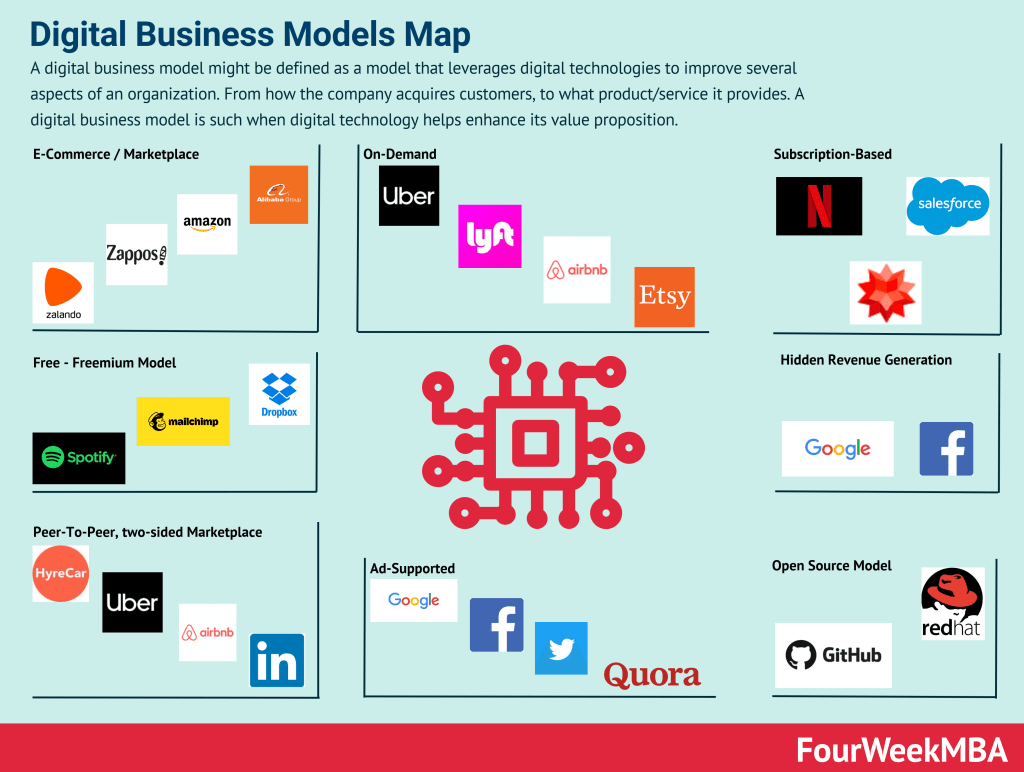
A digital business model might be defined as a model that leverages digital technologies to improve several aspects of an organization. From how the company acquires customers, to what product/service it provides. A digital business model is such when digital technology helps enhance its value proposition.
A tech business model is made of four main components: value model (value propositions, mission, vision), technological model (R&D management), distributionmodel (sales and marketingorganizational structure), and financial model (revenue modeling, cost structure, profitability and cash generation/management). Those elements coming together can serve as the basis to build a solid tech business model.
A platform business model generates value by enabling interactions between people, groups, and users by leveraging network effects. Platform business models usually comprise two sides: supply and demand. Kicking off the interactions between those two sides is one of the crucial elements for a platform business model success.
A Blockchain Business Model is made of four main components: Value Model (Core Philosophy, Core Value and Value Propositions for the key stakeholders), Blockchain Model (Protocol Rules, Network Shape and Applications Layer/Ecosystem), Distribution Model (the key channels amplifying the protocol and its communities), and the Economic Model (the dynamics through which protocol players make money). Those elements coming together can serve as the basis to build and analyze a solid Blockchain Business Model.
In an asymmetric businessmodel, the organization doesn’t monetize the user directly, but it leverages the data users provide coupled with technology, thus have a key customer pay to sustain the core asset. For example, Google makes money by leveraging users’ data, combined with its algorithms sold to advertisers for visibility.
In an asymmetric businessmodel, the organization doesn’t monetize the user directly, but it leverages the data users provide coupled with technology, thus having a key customer pay to sustain the core asset. For example, Google makes money by leveraging users’ data, combined with its algorithms sold to advertisers for visibility. This is how attention merchants make monetize their business models.
While the term has been coined by Andrew Lampitt, open-core is an evolution of open-source. Where a core part of the software/platform is offered for free, while on top of it are built premium features or add-ons, which get monetized by the corporation who developed the software/platform. An example of the GitLab open core model, where the hosted service is free and open, while the software is closed.
Cloud business models are all built on top of cloud computing, a concept that took over around 2006 when former Google’s CEO Eric Schmit mentioned it. Most cloud-based business models can be classified as IaaS (Infrastructure as a Service), PaaS (Platform as a Service), or SaaS (Software as a Service). While those models are primarily monetized via subscriptions, they are monetized via pay-as-you-go revenue models and hybrid models (subscriptions + pay-as-you-go).
Open source is licensed and usually developed and maintained by a community of independent developers. While the freemium is developed in-house. Thus the freemium give the company that developed it, full control over its distribution. In an open-source model, the for-profit company has to distribute its premium version per its open-source licensing model.
The freemium – unless the whole organization is aligned around it – is a growth strategy rather than a business model. A free service is provided to a majority of users, while a small percentage of those users convert into paying customers through the sales funnel. Free users will help spread the brand through word of mouth.
A freeterprise is a combination of free and enterprise where free professional accounts are driven into the funnel through the free product. As the opportunity is identified the company assigns the free account to a salesperson within the organization (inside sales or fields sales) to convert that into a B2B/enterprise account.
A marketplace is a platform where buyers and sellers interact and transact. The platform acts as a marketplace that will generate revenues in fees from one or all the parties involved in the transaction. Usually, marketplaces can be classified in several ways, like those selling services vs. products or those connecting buyers and sellers at B2B, B2C, or C2C level. And those marketplaces connecting two core players, or more.
B2B, which stands for business-to-business, is a process for selling products or services to other businesses. On the other hand, a B2C sells directly to its consumers.
A B2B2C is a particular kind of business model where a company, rather than accessing the consumer market directly, it does that via another business. Yet the final consumers will recognize the brand or the service provided by the B2B2C. The company offering the service might gain direct access to consumers over time.
Direct-to-consumer (D2C) is a business model where companies sell their products directly to the consumer without the assistance of a third-party wholesaler or retailer. In this way, the company can cut through intermediaries and increase its margins. However, to be successful the direct-to-consumers company needs to build its own distribution, which in the short term can be more expensive. Yet in the long-term creates a competitive advantage.
The C2C business model describes a market environment where one customer purchases from another on a third-party platform that may also handle the transaction. Under the C2C model, both the seller and the buyer are considered consumers. Customer to customer (C2C) is, therefore, a business model where consumers buy and sell directly between themselves. Consumer-to-consumer has become a prevalent business model especially as the web helped disintermediate various industries.
A retail business model follows a direct-to-consumer approach, also called B2C, where the company sells directly to final customers a processed/finished product. This implies a business model that is mostly local-based, it carries higher margins, but also higher costs and distribution risks.
The wholesale model is a selling model where wholesalers sell their products in bulk to a retailer at a discounted price. The retailer then on-sells the products to consumers at a higher price. In the wholesale model, a wholesaler sells products in bulk to retail outlets for onward sale. Occasionally, the wholesaler sells direct to the consumer, with supermarket giant Costco the most obvious example.
The term “crowdsourcing” was first coined by Wired Magazine editor Jeff Howe in a 2006 article titled Rise of Crowdsourcing. Though the practice has existed in some form or another for centuries, it rose to prominence when eCommerce, social media, and smartphone culture began to emerge. Crowdsourcing is the act of obtaining knowledge, goods, services, or opinions from a group of people. These people submit information via social media, smartphone apps, or dedicated crowdsourcing platforms.
In a franchained business model (a short-term chain, long-term franchise) model, the company deliberately launched its operations by keeping tight ownership on the main assets, while those are established, thus choosing a chain model. Once operations are running and established, the company divests its ownership and opts instead for a franchising model.
Businesses employing the brokerage business model make money via brokerage services. This means they are involved with the facilitation, negotiation, or arbitration of a transaction between a buyer and a seller. The brokerage business model involves a business connecting buyers with sellers to collect a commission on the resultant transaction. Therefore, acting as a middleman within a transaction.
Dropshipping is a retail business model where the dropshipper externalizes the manufacturing and logistics and focuses only on distribution and customer acquisition. Therefore, the dropshipper collects final customers’ sales orders, sending them over to third-party suppliers, who ship directly to those customers. In this way, through dropshipping, it is possible to run a business without operational costs and logistics management.
Gennaro is the creator of FourWeekMBA, which reached about four million business people, comprising C-level executives, investors, analysts, product managers, and aspiring digital entrepreneurs in 2022 alone | He is also Director of Sales for a high-tech scaleup in the AI Industry | In 2012, Gennaro earned an International MBA with emphasis on Corporate Finance and Business Strategy.