Figma alternatives comprise tools like Sketch, Adobe XD, InVision Studio, and Marvel for design and prototyping. Collaboration tools comprise Miro, Framer, Zeplin, and Abstract for enhanced teamwork and collaboration.
Alternative
Key Features
Core Strengths
Weaknesses
Adobe XD
1. Adobe Ecosystem: Integration with other Adobe tools. 2. Prototyping: Strong prototyping capabilities. 3. Design Systems: Supports design system management.
– Seamless integration with other Adobe creative software. – Robust prototyping features for interactive designs. – Supports design system management for consistency.
– Requires a Creative Cloud subscription for full features. – May have a learning curve for beginners. – Collaboration features may not be as advanced as Figma.
Sketch
1. Mac Compatibility: Exclusive to macOS. 2. Plugins: Extensive plugin ecosystem. 3. Vector Editing: Strong vector editing capabilities.
– Native macOS application optimized for Apple users. – Extensive plugin ecosystem for customization. – Powerful vector editing tools for precision.
– Limited to macOS, excluding Windows and Linux users. – Collaboration requires third-party tools. – No built-in cloud collaboration features like Figma.
InVision Studio
1. Prototyping: Focuses on advanced prototyping features. 2. Animation: Strong animation capabilities. 3. Collaboration: Supports team collaboration.
– Specialized in advanced prototyping and animation features. – Collaboration tools for team-based design projects. – Integrates with InVision for end-to-end design and prototyping.
– May not offer the same breadth of design features as Figma. – Requires integration with InVision for full collaboration features. – Learning curve for beginners.
Proto.io
1. Web-Based: Accessible via a web browser. 2. Interactive Prototyping: Strong interactive prototyping tools. 3. Collaboration: Supports collaboration.
– Web-based platform for accessibility from anywhere. – Emphasizes interactive prototyping for user testing. – Collaboration features for team-based design projects.
– May not have as many design features as Figma. – Limited vector editing capabilities. – Pricing plans may not suit all budgets.
Axure RP
1. Prototyping: Specializes in prototyping and wireframing. 2. Complex Interactions: Allows complex interactions. 3. Team Collaboration: Supports team collaboration.
– Focused on advanced prototyping and wireframing. – Capable of handling complex interactions and user flows. – Collaboration features for team collaboration on design projects.
– May lack some of the graphic design features found in Figma. – Learning curve for beginners. – Collaboration features may not be as seamless as Figma’s.
Balsamiq
1. Wireframing: Specialized in wireframing. 2. Low Fidelity: Emphasizes low-fidelity design. 3. Ease of Use: User-friendly interface.
– Ideal for quick and low-fidelity wireframing. – User-friendly interface for easy adoption. – Streamlines the wireframing process without overwhelming features.
– Not suitable for high-fidelity design work. – May require another tool for high-fidelity design after wireframing. – Collaboration features are limited compared to Figma.
– Allows code-based interactions for more advanced interactivity. – Advanced animation capabilities for rich user experiences. – Supports component libraries for design consistency.
– May not be as user-friendly for designers without coding experience. – Collaboration features may not be as comprehensive as Figma’s. – Learning curve for beginners.
Adobe Illustrator
1. Vector Design: Strong vector design capabilities. 2. Illustration: Specialized in illustration. 3. Integration: Integrates with Adobe’s ecosystem.
– Powerful vector design tools for creating illustrations and graphics. – Specialized for illustration work. – Integrates seamlessly with other Adobe creative software.
– Not a dedicated UI/UX design tool. – Collaboration features are limited compared to Figma. – May require additional tools for prototyping and collaboration.
Adobe generated most of its revenue (93%) from subscriptions in 2022. Indeed, the company generated $16.39 billion in subscriptionrevenue in 2022 compared to $686 million from services, and $532 million from product
Adobe generates most of its revenue from subscriptions. The subscriptionbusiness consists of digital media, digital experiences, and publishing & advertising. Indeed, in 2022, Adobe generated $12.38 billion in digital media, $3.88 billion in digital experiences, and $123 million from publishing & advertising.
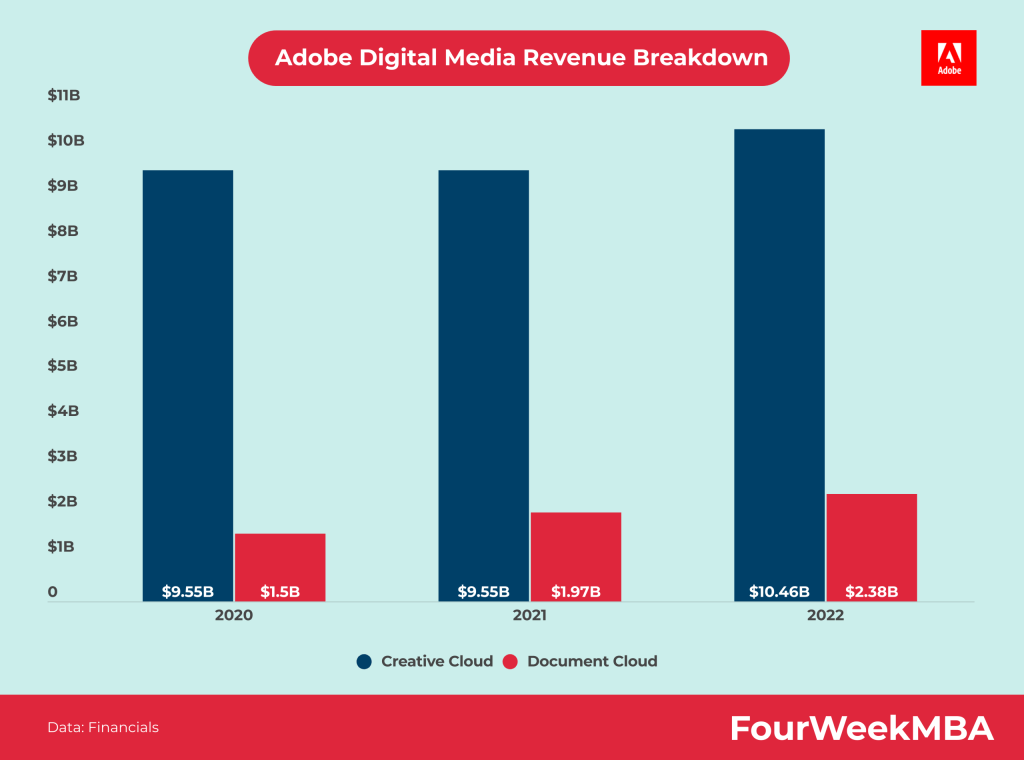
The Adobe digital media business consists of two segments: creative cloud and document cloud. In 2022, Adobe generated $10.46 billion from creative cloud vs. $2.38 from document cloud.
Adobe has a coststructure skewed toward subscriptions, which carry a high gross margin compared to other segments. Indeed, subscriptions generate most of the revenue for Adobe, and in 2022, for instance, on $17.6 billion in revenue, $2.16 in cost of revenue, and $15.44 in gross margins.
Adobe spent $4.97 billion in sales and marketingexpenses in 2022, which represented 28% of its total revenue. Compared to $4.32 billion in 2021, which represented 27% of its total revenue.
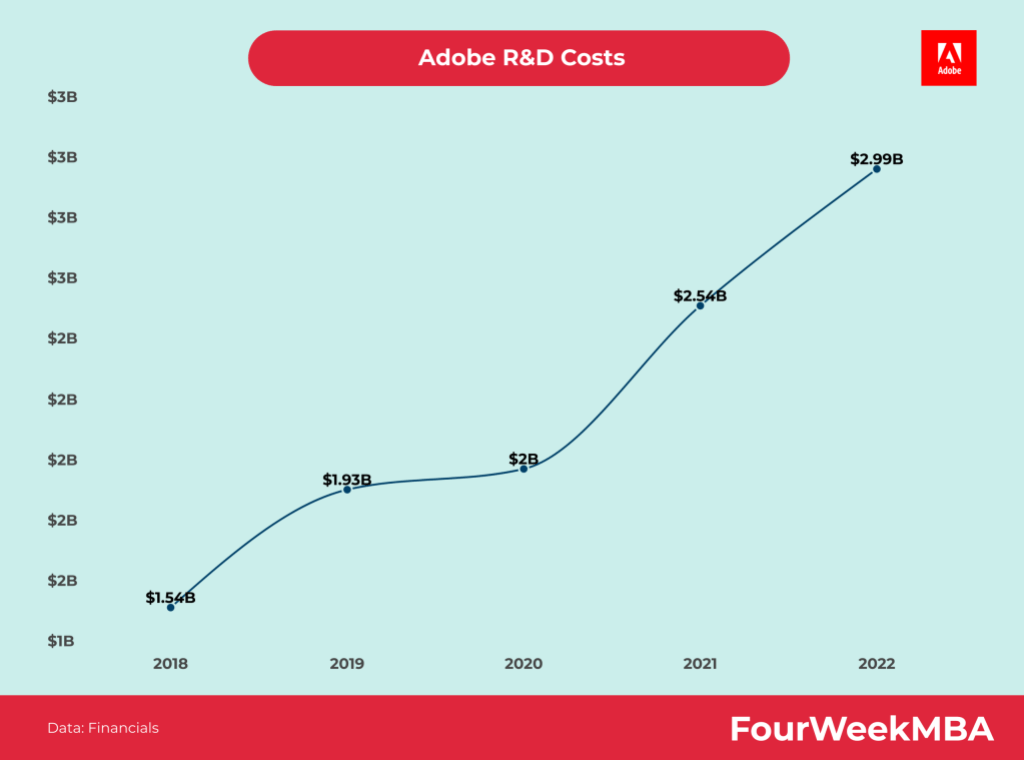
Adobe spent $2.99 billion in R&D expenses in 2022, which represented 17% of its total revenue, vs. $2.54 billion in 2021, which represented 16% of its total revenue.
Gennaro is the creator of FourWeekMBA, which reached about four million business people, comprising C-level executives, investors, analysts, product managers, and aspiring digital entrepreneurs in 2022 alone | He is also Director of Sales for a high-tech scaleup in the AI Industry | In 2012, Gennaro earned an International MBA with emphasis on Corporate Finance and Business Strategy.